
Reading time: 10 min
"I Have Your IP Address!": The Truth About Network Tracking
When I was a little kid surfing the web, and brightening people's days with my witty comments, I would often find myself warned by my victims that they would find me by my IP address. I mostly shrugged it off and laughed but a part of me still wondered if they actually could find me. Let’s see if that really is possible.
Alright, let's dive into the nitty gritty: An IP (Internet Protocol) address is a unique number that enables devices to find and communicate with each other within the same network.
If your device is not connected to a network, it simply does not have an IP address. And for each network it gets connected to, it gets a different IP address. So your device IP keeps changing as you move from one network to another. However, each device that is capable of connecting to a network must have a burned-in MAC address in its network circuit that is assigned by the manufacturer. And that my friends, cannot be changed (unless you spoof it, iykwim). Basically, if you do not have a MAC address, you cannot have an IP address.
To get Internet Protocol addresses, we first need to create a network. A network is just a collection of two or more devices connected together. You can either establish this with physical wires or with radio frequency over Wi-Fi. For the sake of the good old days and simplicity, let’s stick to our copper friends for now.
Network
A proper network usually needs a minimum of two devices:
| Switch | A Dynamic Host Configuration Protocol (DHCP) Server |
|---|---|
| Acts as the physical junction for a network, connecting devices like computers and cameras via ethernet cables and efficiently switching data between them. | A piece of software that assigns IP addresses dynamically ensuring seamless and conflict-free communication across the network. |
A sophisticated local area network (LAN) looks like this:
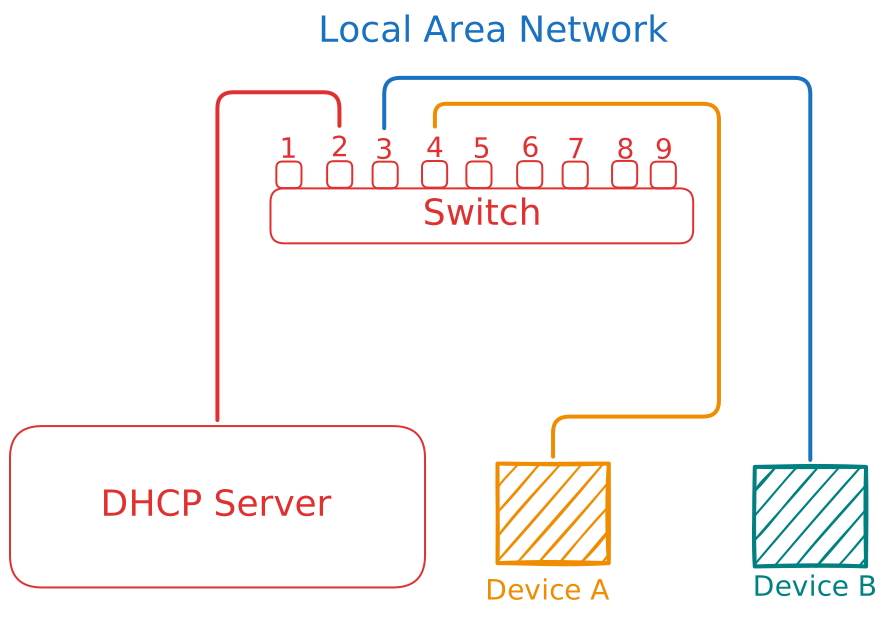
*I specifically left the 1st port of the switch empty to show you that the order does not really matter.
When you connect a device to a network, their network adapters suddenly become alive and go into existential crisis and ask this question immediately “Who the heck am I?” and turn to the DHCP server for answers. The DHCP server looks at their MAC addresses through the switch, treats those addresses like a badge number and assigns each a unique Internet Protocol address. The connected devices then see each other’s addresses and share information.
IP Address Structure
Now that we know the DHCP server assigns IP addresses, let's see how it picks them. Most DHCP servers at home or at work assign addresses starting with 192.168.x.y, up to 192.168.255.255. The x indicates the subnet — usually 1 — and the y represents the device.
But why does it almost always start with 192.168? The answer traces back to the early 1990s, when the internet was expanding fast and engineers realized we were going to run out of public IP addresses. To delay that, they carved out "private" blocks that anyone could use internally without registering them.
Picking the specific numbers fell largely to Jon Postel, a pioneering internet architect who single-handedly managed the global IP ledger. There was no magical math involved. Postel simply looked at his ledger: addresses in the 192.150s and 192.160s were actively being handed out, and the next completely untouched block sitting on his desk was 192.168.0.0. So he pulled it off the public market and declared it private forever. Today it remains the default for almost every home router in the world.
Since x and y can each be any number from 0 to 255, a 192.168.x.y network gives you virtually 256 × 256 = 65,536 unique addresses.
You can create a subnet if you want to split your network up. Most homes do not need this, but large organizations usually do — separating the cameras from the computers, or a university keeping staff machines apart from student machines. It improves security and keeps things organized. Two separated networks inside the same parent network cannot talk to each other directly, but you can write your own permission rules.
To create local subnets and reach the global internet, you need a router. With the router's help and permission, computers can communicate across subnets in a roundabout way — and you connect to the internet, which is itself just a network, in exactly the same fashion.
Before we get into the global internet and devices like modems, routers, and gateways, let's look at the railway of a network: the Ethernet cable.
Ethernet Cable (RJ45)
RJ45 is just a fancy name for the Ethernet cable, which holds 4 pairs of wires inside: orange, green, blue, and brown. You can arrange them in two ways — T-568A and T-568B. Both perform the exact same function; only the positions of the orange and green wires are switched.
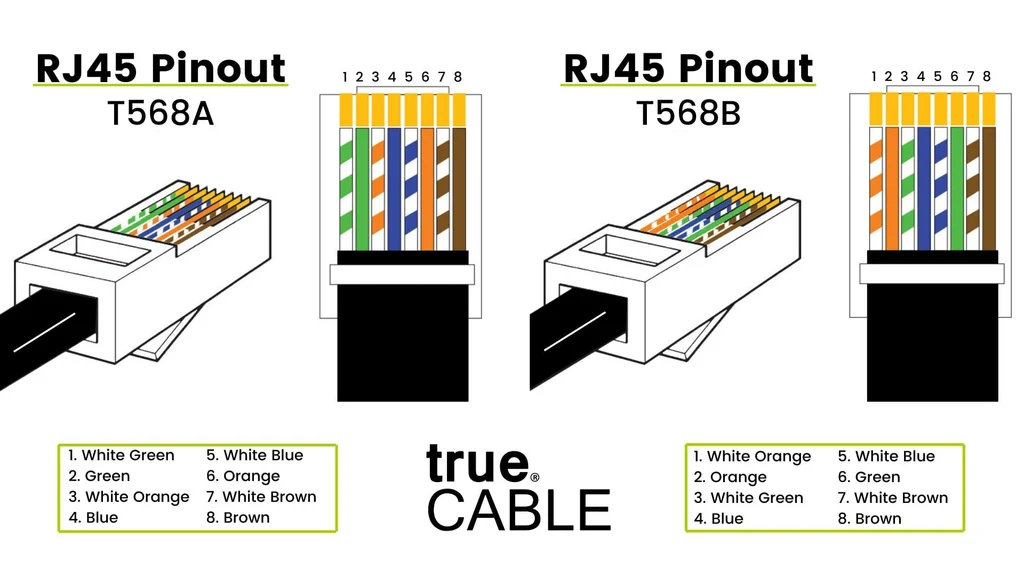
What happens inside is that these bad boys carry information as electrical signals, moving electrons one direction or another through the copper wires. The connected computer interprets those signals and converts them into binary so it can understand them. Those binary digits are called bits for short.
If you took a switch and connected 5 computers to it with Ethernet cables, you would have a LAN (Local Area Network). Those computers could talk to each other freely — send files and messages, play a local multiplayer game — all by sharing electrical signals.
But if you tried to visit a website from any of them, you would fail. The switch has no idea what the internet is. It only knows about the computers plugged into it.
Internet
Now that we can build a local network, let's connect it to the global one. When you pay for internet service, the company shows up with a box, does some wiring, and installs it on your premises. That box is called a gateway, and it is an all-in-one device with several devices built into it.
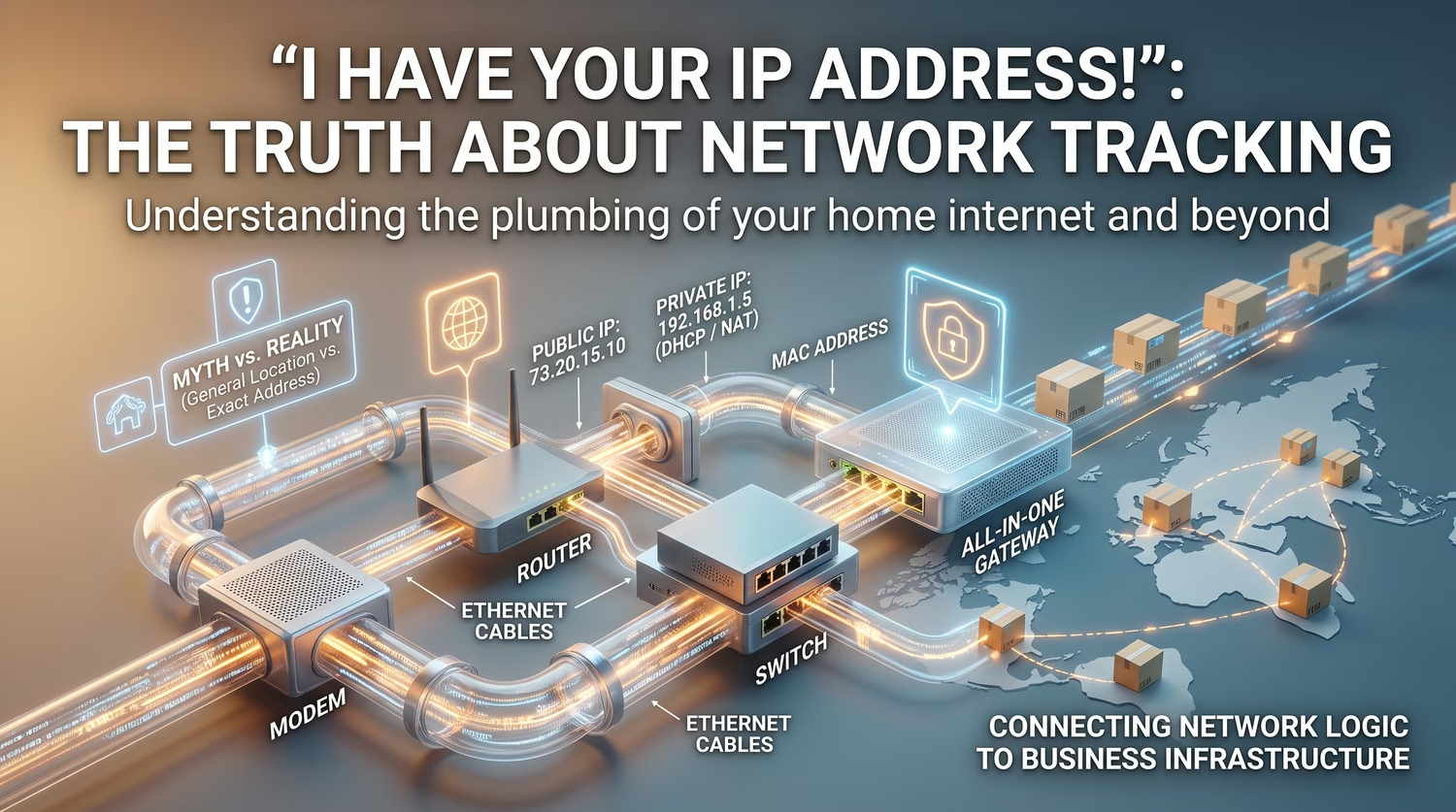
To get online you need a modem, a router, a switch, and a DHCP server — and the gateway holds all four. Your Internet Service Provider (ISP) delivers the connection as pulses of light (fiber optic), radio frequencies (cable or coaxial), or high-frequency digital signals over existing phone lines (DSL).
The modem, much like the microfilter splitter above, is a dumb pipe optimized to translate the physical signal from your ISP into electrical Ethernet signals. Without it, your router has no idea how to get going.
Just like your local DHCP server hands out addresses inside your network, your ISP runs a DHCP server that hands out public addresses to its clients. Your router, through the modem, asks for one, and the ISP assigns a public IP address to it. That address is dynamic — it changes if you leave your modem off for a while — which lets ISPs rotate a pool of addresses among their clients instead of burning a permanent one on every household.
The router ends up with a public-facing IP, something like 73.20.15.10. You can find yours on a site like whatismyipaddress.com, created by Chris Parker in 2000.
From there the router does two jobs. First it creates a local network and uses its DHCP server to hand a private IP to every device so they can share the one connection. Then it uses NAT (Network Address Translation) to translate traffic back and forth between that single public IP and all the private ones inside. Because NAT hides your internal network from the outside world, it naturally acts as a firewall: your devices can reach the internet, while staying protected from direct connection attempts from anyone on it.
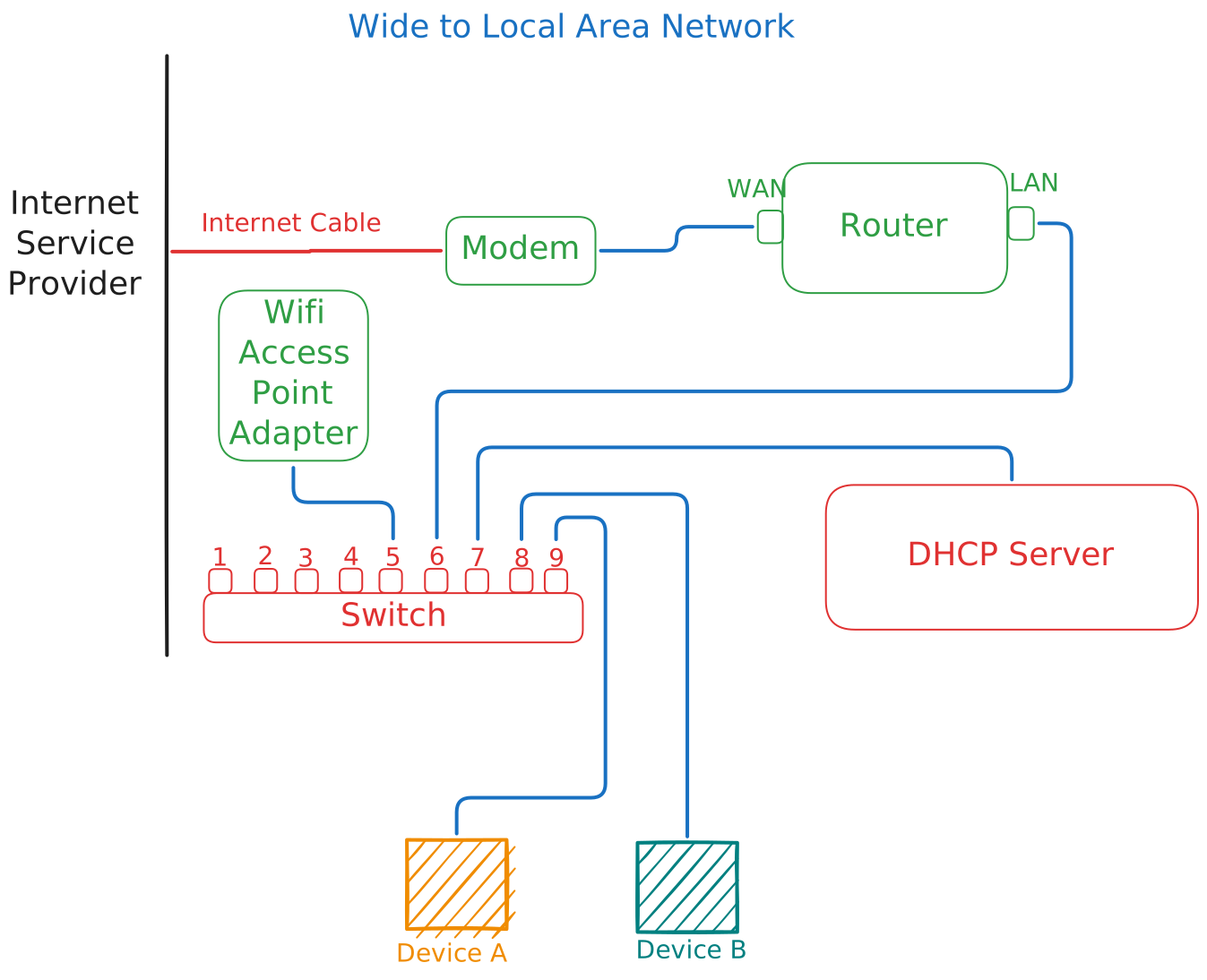
- ISP sends the internet signal down the wire.
- Modem receives the raw signal, translates it to Ethernet, and passes it straight through.
- Router (WAN port) receives the translated signal, talks to the ISP, and is assigned your one public IP address.
- Router (LAN ports) create the private network boundaries and use NAT to translate internet traffic for them. This is also why you can open your router's settings by visiting its IP address (usually 192.168.1.1) in a browser.
- Switch plugs into the router's LAN port to provide physical connections for the devices on that network.
- DHCP server is built into the router as a software function, handing out local private IPs to devices as they connect.
The Final Verdict: Is Your IP Address a Liability?
So, back to the fear of my childhood: can someone "find" you by your IP address? Technically, yes — they can identify your general location, like your city or zip code, and your Internet Service Provider. But they are not showing up at your front door over a stray packet of data. The only entity that can trace your IP to an exact physical address is your ISP, and they keep that under lock and key unless the authorities arrive with a legal warrant. But hey, I'm hoping you never have that kind of trouble.
The internet isn't some lawless wild west. It is a massive, highly ordered system built on protocols, hardware, and traffic rules that make sure data reaches where it needs to go without colliding into everything else. What we've explored today is the plumbing of the modern world. Whether it's an Ethernet cable, a DHCP server, or a router handling NAT, every component exists to move information reliably from point A to point B.
The Business Connection
Interestingly, the logic that powers the internet is the same logic we apply to business. Whether you are routing data packets across the globe or routing a complex supply chain across a distributor network, the challenges are identical: you need accuracy, speed, and a system that knows exactly where information belongs.
At Nejum, we believe business systems should be as reliable and streamlined as the network infrastructure that powers them. If managing your distributor network feels like a tangled mess of cables without a switch, it might be time to look at your business infrastructure.
Stay tuned for the next post in the series, where we dive deeper into the systems that keep the modern world turning.